
Travel Nurse Tech Setup: Apps, Gadgets, and Gear
Disclosure: Some links in this post are affiliate links. If you click through and make a purchase, we may earn a small commission at no extra cost to you. Learn more about how we make money.
Technology Makes the Travel Lifestyle Work
Travel nursing existed before smartphones and cloud storage, but it was harder. Keeping track of credentials across multiple states, staying connected with family and friends, managing finances on the road, and maintaining any sense of continuity between assignments all required more effort, more paper, and more stress.
Today, the right tech setup handles most of that complexity. Your phone, laptop, and a handful of well-chosen apps and gadgets create a portable command center that travels with you to every assignment. The key is building a system once and refining it over time, rather than scrambling to figure out technology at every new location.
This guide covers the essential apps, hardware, and digital practices that keep experienced travel nurses organized, connected, and protected.
Essential Apps for Travel Nurses
Your phone is your most important organizational tool. The right apps turn it into a credential tracker, expense log, shift scheduler, and clinical reference all at once.
Credential and job tracking apps designed for travel healthcare professionals let you store licenses, certifications, immunization records, and skills checklists in one place. They track expiration dates and send renewal reminders, which prevents the nightmare of discovering an expired certification during onboarding. Several staffing agencies have their own apps, but a dedicated third-party credential manager gives you a single source of truth that works regardless of which agency you use.
Clinical reference apps provide drug databases, lab value references, clinical calculators, and procedure guides at the point of care. These are especially valuable during your first few shifts at a new facility, when you are still learning their protocols and formulary. Download content for offline access in case the facility has poor cell coverage or restricts personal phone use on the unit.
Expense and mileage tracking apps automate the financial record-keeping that travel nurse taxes require. An app that logs mileage automatically using GPS, categorizes expenses, and exports reports at tax time saves hours of manual tracking and reduces the risk of missing deductions. Start using one before your first assignment, not at tax time when you are trying to reconstruct a year of receipts.
Shift scheduling apps that sync with your calendar keep your work schedule, appointment dates, and personal plans in one view. This matters more for travel nurses than for staff nurses because your schedule changes with every assignment, and keeping family and friends updated on your availability prevents missed connections.
Communication and Staying Connected
Staying connected with your personal network is one of the biggest challenges of travel nursing, and technology is the primary solution.
Set up a reliable video calling system on both your phone and your laptop. Video calls are how you maintain relationships across distance, and having a setup that works well, with good audio, a decent camera angle, and stable internet, makes those calls feel more natural and sustainable.
A VPN is essential any time you use public WiFi, whether at a coffee shop, a hotel during transit, or a hospital break room. Public networks are easy targets for data interception, and a VPN encrypts your connection to protect passwords, financial information, and personal data. Several reputable VPN services offer affordable annual plans with apps for both phone and laptop.
Travel nurse communities on social media and messaging platforms are valuable for practical advice, emotional support, and social connection in new cities. Join groups specific to your specialty, your current assignment city, and the general travel nurse community. These groups are where you will find local restaurant recommendations, gym suggestions, housing warnings, and the camaraderie of people who understand the lifestyle.
Portable WiFi and Hotspot Solutions
Reliable internet access is not optional for a travel nurse. You need it for credential management, communication, entertainment, and basic daily tasks. Furnished apartment WiFi quality is unpredictable, so having a backup plan is essential.
A dedicated mobile hotspot device provides internet access independent of your phone, which means you can use both simultaneously without throttling. Look for a device that supports the latest network standards and is compatible with the carrier that has the best coverage in your assignment region. Coverage maps vary significantly between carriers, so check coverage at your specific assignment address before committing.
If a dedicated hotspot feels like overkill, your phone’s built-in tethering capability serves as a backup when apartment WiFi fails. Just be aware of your data plan limits. Streaming video through a phone hotspot burns through data fast.
A WiFi range extender is a cheaper alternative that addresses the most common apartment internet problem: weak signal in the bedroom or living area. These small devices plug into an outlet and rebroadcast the existing WiFi signal, often improving coverage enough to solve the problem without adding a separate internet connection.
Charging and Power Management
Travel nurses charge more devices more often than most people realize. Your phone, laptop, smartwatch, earbuds, portable battery, and any other gadgets all need daily or near-daily charging. A cluttered nest of individual chargers is inefficient and easy to lose parts of.
A compact multi-port charging station consolidates everything. Look for a station with at least four ports, a mix of USB-A and USB-C, and enough total wattage to fast-charge your phone and another device simultaneously. A station that includes a small shelf or stand for devices keeps the charging area organized.
A portable battery pack with ten thousand milliamp hours or higher capacity keeps your phone alive during long shifts, road trips, and travel days when outlet access is limited. If your phone supports wireless charging, a battery pack with built-in wireless charging capability eliminates the need for a cable.
For your car, a multi-port charger with USB-C Power Delivery handles phone charging and can even top off a laptop during long drives. Keep one permanently in your car so you never forget it.
A compact power strip with surge protection is essential for furnished apartments that never have enough outlets. Pack one for the bedroom and consider a second for your living area or workstation.
Laptop and Tablet Recommendations
A laptop is worth carrying for credential management, financial tasks, online learning, and personal use. Your phone handles most quick tasks, but a laptop is better for anything that requires multiple tabs, detailed forms, or extended typing.
For travel nurses, the ideal laptop is lightweight, durable, and affordable enough that damage or theft during a move does not create a financial crisis. A thirteen-to-fourteen-inch screen balances usability with portability. Eight gigabytes of RAM and a solid-state drive provide adequate performance for web browsing, document management, and streaming.
A tablet serves as a middle ground between phone and laptop. It is better for reading, studying, streaming in bed, and video calls than a phone, but lighter and more portable than a laptop. If you are deciding between the two, a laptop is more versatile. If you can carry both, a tablet adds genuine comfort and convenience.
Protect your devices during moves with padded sleeves or cases. Electronics are vulnerable to drops, compression, and temperature extremes in a packed car or checked luggage. A neoprene sleeve for your laptop and a case for your tablet are cheap insurance against expensive damage.
Entertainment on the Go
Your entertainment setup travels with you and keeps you sane during downtime, road trips, and quiet evenings in an unfamiliar apartment.
A compact streaming device that plugs into any television gives you instant access to your streaming accounts at every assignment. Furnished apartment TVs rarely have smart capabilities, and logging into apps on a shared TV is a security risk. Your own device keeps your accounts safe and your content accessible.
Noise-canceling headphones are dual-purpose: they provide quality audio for entertainment and block noise for day sleeping after night shifts. Over-ear models offer better noise cancellation and audio quality. In-ear models are more portable and easier to sleep in. Many travel nurses own one of each.
An e-reader is lighter than a stack of books and holds an entire library. If you read frequently, the dedicated screen is easier on your eyes than a tablet, especially before sleep. Download books before you travel in case your new apartment has slow internet on arrival day.
Download entertainment for offline access before every move. Road trips through rural areas, flights, and the first night in a new apartment before internet is set up are all times when offline content is the only option.
Smart Home Gadgets for Temporary Housing
A few portable smart home devices can make any apartment feel more comfortable and functional within minutes of arrival.
A portable smart speaker provides voice-controlled music, timers, weather updates, and alarms. It is a small comfort item that adds surprising normalcy to a temporary space. A compact white noise machine, or a smart speaker set to play white noise, protects sleep quality in apartments with thin walls or unfamiliar sounds.
Smart plugs let you automate lamps and small appliances with your phone or voice. Set a lamp to turn on before you get home from a night shift so you do not walk into a dark apartment. Set a coffee maker to start brewing before your alarm goes off. These are small conveniences, but they add up to a living space that feels more like home.
A small portable night light or motion-activated light makes navigating an unfamiliar apartment in the dark safer, especially during the first few nights before you have memorized the layout.
Digital Organization and Cloud Storage
Cloud storage is the backbone of travel nurse document management. Every important document should exist in a secure cloud folder that you can access from any device, anywhere.
Store digital copies of your nursing licenses, certifications, immunization records, tax documents, insurance cards, and assignment contracts. Organize them in clearly labeled folders with a naming convention that includes dates, so you can find what you need quickly during onboarding or at tax time.
A password manager is not optional for anyone who maintains accounts across multiple facilities, staffing agencies, financial institutions, and personal services. A good password manager generates strong, unique passwords for every account, stores them securely, and auto-fills login forms on your phone and laptop. This is the single most impactful cybersecurity tool for travel nurses.
Back up photos regularly, especially photos you take of housing conditions at move-in. These serve as documentation if there is a dispute about damage when you leave. Cloud photo backup handles this automatically if you enable it.
Cybersecurity for Travel Nurses
Travel nurses face elevated cybersecurity risks because they use more networks, more devices, and more accounts than the average person. A few practices significantly reduce your exposure.
Use a VPN on any network you do not control. This includes apartment WiFi, hospital guest networks, hotel WiFi, and coffee shop hotspots. A VPN encrypts your internet traffic so that anyone monitoring the network cannot see your data.
Enable two-factor authentication on every account that supports it. This adds a second verification step beyond your password, usually a code sent to your phone. Even if a password is compromised, two-factor authentication blocks unauthorized access.
Do not access sensitive accounts on shared computers. Hospital workstations, library computers, and housing office computers may have keyloggers or cached sessions. Use your own devices for banking, tax filing, credential management, and any account that contains personal information.
Keep your devices updated. Software updates frequently include security patches for known vulnerabilities. Enable automatic updates on your phone and laptop so you do not fall behind.
Frequently Asked Questions
What apps should every travel nurse have on their phone?
Every travel nurse should have a credential management app that tracks license and certification expiration dates, a clinical reference app with drug databases and lab values for offline access, an expense and mileage tracking app for tax documentation, and a shift scheduling app that syncs with your calendar. Using a dedicated third-party credential manager rather than relying solely on your agency’s app gives you a single source of truth that works regardless of which agency you are working with.
Do travel nurses need a portable WiFi hotspot?
A portable WiFi solution is strongly recommended because furnished apartment internet quality is unpredictable. A dedicated mobile hotspot device provides internet access independent of your phone, allowing you to use both simultaneously without throttling. If a separate device feels like overkill, your phone’s built-in tethering works as a backup when apartment WiFi fails. A cheaper alternative is a WiFi range extender that plugs into an outlet and improves weak apartment signals.
How do travel nurses protect their data and privacy?
Use a VPN on any network you do not control, including apartment WiFi, hospital guest networks, and coffee shop hotspots. Enable two-factor authentication on every account that supports it. Use a password manager to generate and store strong unique passwords for the many accounts you maintain across agencies, facilities, and financial institutions. Never access banking or sensitive accounts on shared computers like hospital workstations, and keep all devices updated with the latest security patches.
What laptop should a travel nurse buy?
The ideal travel nurse laptop is lightweight, durable, and affordable enough that damage or theft during a move does not create a financial crisis. A thirteen-to-fourteen-inch screen balances usability with portability, and eight gigabytes of RAM with a solid-state drive provides adequate performance for credential management, financial tasks, online continuing education, and streaming. Protect it during moves with a padded neoprene sleeve, as electronics are vulnerable to drops and compression in a packed car.
Is a streaming device worth packing?
Yes, a compact streaming device that plugs into any television is one of the highest-value tech items for travel nurses. Furnished apartment TVs rarely have smart capabilities, and logging into your streaming accounts on a shared TV is a security risk. Your own device keeps your accounts safe and gives you instant access to your content at every assignment. It weighs almost nothing, takes up negligible space, and provides entertainment from your first evening in a new apartment.
Key Takeaways
- Build a portable tech setup once and refine it with each assignment. The combination of a smartphone with essential apps, a laptop, a portable hotspot or WiFi backup, and a compact charging station covers your core needs.
- Keep all important documents in secure cloud storage with backups. This protects you from lost paperwork and speeds up onboarding at every new facility.
- Use a VPN on public networks, a password manager for all accounts, and two-factor authentication everywhere. Cybersecurity basics prevent problems that are costly and time-consuming to fix.
- Download entertainment and maps for offline access before every move. Reliable connectivity is never guaranteed on the road or in your first hours at a new location.
- Invest in noise-canceling headphones and a streaming device. These two items do more for your quality of life on assignment than almost any other tech purchase.
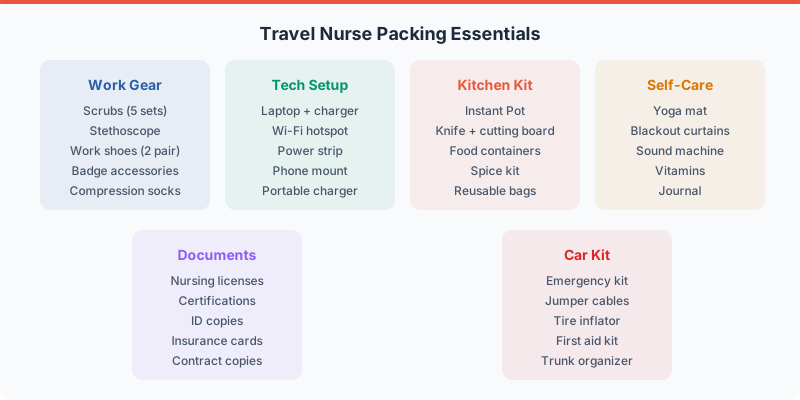
For the complete gear breakdown, check out our ultimate travel nurse packing list.
Related Internal Links
- Travel Nurse Packing List
- Travel Nurse Car Essentials
- Travel Nurse Self-Care Kit
- Travel Nurse Badge Accessories
Affiliate Placement Notes
- Mobile hotspot device affiliate link
- Multi-port charging station affiliate link
- Laptop and tablet affiliate links
- Streaming device affiliate link
- Noise-canceling headphones affiliate link
- VPN service affiliate link
- Password manager affiliate link
