
Travel Nurse Pay Calculator Guide: How to Use It Like a Pro

Disclosure: Some links in this post are affiliate links. If you click through and make a purchase, we may earn a small commission at no extra cost to you. Learn more about how we make money.
Introduction: Why You Need a Pay Calculator
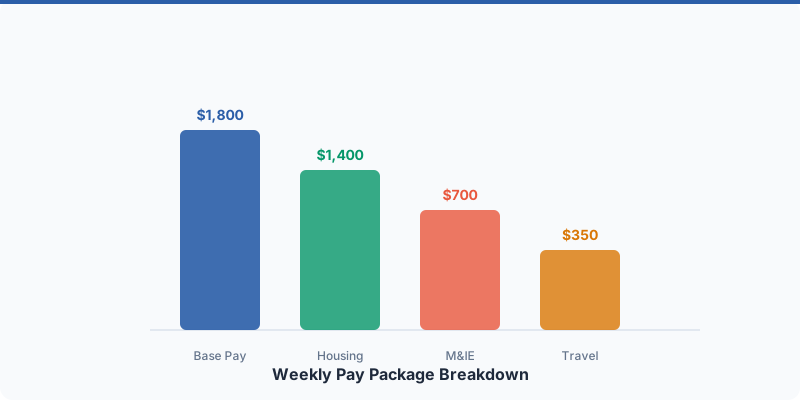
Travel nurse pay packages are uniquely complicated. A single contract offer contains half a dozen line items — taxable hourly rate, housing stipend, M&IE stipend, travel reimbursement, completion bonus, insurance deductions — each with its own tax treatment. Trying to compare two or three of these packages in your head, or even on a napkin, is a recipe for expensive mistakes.
I have watched nurses accept contracts worth $3,000 less over 13 weeks because they were swayed by a higher hourly rate without realizing the stipends were lower. I have seen others turn down better offers because the gross numbers looked similar but the tax implications made one package clearly superior.
A pay calculator eliminates the guesswork. It takes your raw contract numbers, applies estimated tax rates, factors in your tax home status, and gives you a clear picture of what will actually land in your bank account each week. Not what the recruiter quotes you. Not the gross number on the job board. Your estimated net take-home pay.
The Excursion Health pay calculator was built specifically for travel nurses. It handles the nuances that generic salary calculators miss — things like tax-free stipends, multi-state taxation, and the difference between taxable and non-taxable income. This guide walks you through how to use it effectively and how to avoid the most common input errors that lead to inaccurate results.
What You Need Before You Start
Before you open the calculator, gather the following information from your recruiter or contract offer. Having these numbers in front of you makes the process fast and accurate.
From your contract offer or recruiter:
- Taxable hourly rate — Your base W-2 wage per hour (not the blended rate)
- Guaranteed hours per week — Typically 36, 40, or 48
- Housing stipend — Weekly or monthly amount (convert to weekly if needed)
- M&IE stipend — Weekly or monthly amount
- Travel reimbursement — One-time or per-trip amount
- Bonuses — Sign-on bonus, completion bonus, referral bonus (and the payout terms)
- Insurance premium deductions — Weekly cost for health/dental/vision if you are using the agency plan
From your personal tax situation:
- Tax filing status — Single, married filing jointly, head of household
- Approximate federal tax bracket — 12%, 22%, 24%, 32% (most travel nurses fall in the 22-24% range)
- Assignment state — The state where you will be working (for state income tax estimation)
Your tax home status:
- Do you have a qualifying tax home? This determines whether your stipends are taxable or non-taxable. If you are unsure, take the tax home quiz before using the calculator. Getting this wrong is the single most common source of calculator inaccuracy.
If your recruiter has not given you an itemized breakdown (taxable rate, stipends listed separately), ask for one. If they only offer a “blended rate,” request the line-by-line details. You cannot use a pay calculator accurately without knowing how your compensation is split between taxable wages and tax-free stipends. See our guide on how to compare pay packages for more on this.
Step-by-Step Calculator Walkthrough
Step 1: Enter Your Base Pay Details
Start with the foundation of your pay package:
Hourly rate: Enter your taxable base hourly rate. This is the rate that appears on your W-2 — typically somewhere between $18 and $35 per hour for most travel nurses. Do not enter your blended rate here. If your recruiter quoted “$55 per hour blended,” you need the taxable base component, not the combined number.
Guaranteed hours per week: Enter the number of hours your contract guarantees. This is usually 36 (three 12-hour shifts), 40 (five 8-hour shifts), or 48 (four 12-hour shifts).
Overtime hours: If your contract includes built-in overtime (such as a 48-hour guarantee that includes 8 hours of OT), or if you expect to pick up extra shifts regularly, enter the anticipated weekly overtime hours. The calculator will apply the 1.5x multiplier to your base rate for these hours. If you are not sure whether OT will be available, run the calculation with and without OT to see both scenarios. Read our overtime pay guide for more on how OT is calculated.
Contract length: Enter the number of weeks, typically 13 for a standard travel nursing contract. This determines how bonuses are prorated and calculates your total contract value.
Step 2: Input Your Stipends
Housing stipend: Enter your weekly housing stipend amount. If your recruiter gave you a monthly figure, divide by 4.33 to get the weekly amount. If they gave you a daily rate, multiply by 7.
M&IE stipend: Enter your weekly meals and incidentals stipend. Same conversion applies if it was quoted in a different time period.
Taxable or non-taxable toggle: This is the most critical input in the entire calculator. Mark your stipends as non-taxable only if you have a qualifying tax home. If you do not have a tax home, your stipends are taxable and should be marked accordingly. Getting this wrong will significantly overstate or understate your estimated take-home pay.
When in doubt, run the calculator both ways — once with stipends marked as non-taxable and once as taxable. The difference between the two results shows you the exact dollar value of maintaining a tax home.
Step 3: Add Bonuses and Extras
Travel reimbursement: Enter any one-time travel reimbursement amount. The calculator prorates this across the contract length to show its weekly contribution. A $1,000 travel reimbursement on a 13-week contract adds about $77 per week.
Completion bonus: Enter the total completion bonus, if any. The calculator will prorate it across the contract. Note that completion bonuses are typically taxable income, so the after-tax value will be lower than the face amount.
Sign-on bonus: If your agency offers a sign-on bonus, enter it here. Like completion bonuses, sign-on bonuses are generally taxable.
Some bonuses have clawback provisions (you must repay if you leave early). The calculator does not model clawback risk, so keep that in mind when evaluating contracts with large bonuses attached to strict completion requirements.
Step 4: Set Your Tax Variables
Assignment state: Select the state where your assignment is located. The calculator uses this to estimate state income tax. If you are comparing contracts in different states, this is where you will see the impact of state tax differences. A contract in Texas (no state income tax) versus California (up to 13.3% state tax) can produce dramatically different take-home numbers even with identical gross pay.
Federal tax bracket: Select or enter your estimated federal tax bracket. For most travel nurses, 22% or 24% is appropriate. If you are unsure, 22% is a reasonable default for single filers earning between $44,726 and $95,375 in taxable income (2026 bracket). Remember, only your taxable wages contribute to your federal tax bracket, not your tax-free stipends.
Insurance deductions: If your agency deducts health insurance premiums from your paycheck, enter the weekly amount. This comes out of your pay before you see it, so it should be factored into your net calculation.
The calculator combines your federal tax estimate, state tax estimate, Social Security (6.2%), and Medicare (1.45%) to calculate total estimated tax on your taxable income. Tax-free stipends are excluded from this calculation.
Step 5: Read Your Results
The calculator presents your results in three key figures:
Gross weekly pay — The total of all compensation components before taxes and deductions. This is the number most recruiters and job boards emphasize, but it is not what you take home.
Estimated net weekly pay — Your estimated take-home after federal tax, state tax, FICA, and insurance deductions. This is the number that actually matters. This is what you can budget with, save, and spend.
Total contract value — Your estimated net pay multiplied by the number of contract weeks. This shows the total expected take-home for the entire assignment.
If you are comparing multiple packages, use the comparison view to line them up side by side. The winning package is not always the one with the highest gross — it is the one with the highest estimated net weekly pay after all taxes and deductions.
Save or export your results so you can reference them during negotiations or revisit them later when you receive updated offers.
Worked Examples
Example 1: Med-Surg Contract in Texas
Package details:
- Base rate: $24/hr
- Guaranteed hours: 36/week
- Housing stipend: $1,260/week
- M&IE stipend: $406/week
- Travel reimbursement: $800 (one-time)
- Completion bonus: $1,000
- Tax home: Yes (stipends are non-taxable)
- Insurance: $85/week
Calculator inputs and results:
- Taxable weekly income: $24 x 36 = $864
- Prorated travel: $800 / 13 = $62
- Prorated bonus: $1,000 / 13 = $77 (taxable)
- Total taxable: $864 + $62 + $77 = $1,003
- Estimated taxes (22% fed + 6.2% SS + 1.45% Medicare, no state tax): ~$297
- After-tax taxable income: $706
- Add non-taxable stipends: $706 + $1,260 + $406 = $2,372
- Subtract insurance: $2,372 - $85 = $2,287
- Estimated weekly take-home: ~$2,287
- Total 13-week contract value: ~$29,731
This Texas package benefits from zero state income tax, keeping more of the taxable portion in your pocket.
Example 2: ICU Contract in California
Package details:
- Base rate: $30/hr
- Guaranteed hours: 36/week
- Housing stipend: $1,680/week
- M&IE stipend: $490/week
- Travel reimbursement: $1,200 (one-time)
- Completion bonus: $0
- Tax home: Yes (stipends are non-taxable)
- Insurance: $120/week
- California daily OT: 4 hours per shift x 3 shifts = 12 hrs/week OT
Calculator inputs and results:
- Regular taxable pay (24 hrs at base): $30 x 24 = $720
- Daily OT (12 hrs at 1.5x): $30 x 1.5 x 12 = $540
- Prorated travel: $1,200 / 13 = $92
- Total taxable: $720 + $540 + $92 = $1,352
- Estimated taxes (24% fed + ~9% CA state + 6.2% SS + 1.45% Medicare): ~$549
- After-tax taxable income: $803
- Add non-taxable stipends: $803 + $1,680 + $490 = $2,973
- Subtract insurance: $2,973 - $120 = $2,853
- Estimated weekly take-home: ~$2,853
- Total 13-week contract value: ~$37,089
Despite California’s high state tax, the daily OT provisions and higher stipends make this package significantly more lucrative than the Texas example. The 12 hours of daily OT built into every standard 36-hour week (three 12-hour shifts) adds substantial taxable income.
Example 3: Comparing Two Competing Offers
Offer A: ER in Florida, $26/hr base, 36 hrs, $1,400 housing, $406 M&IE, $500 travel, no bonus Offer B: ER in Pennsylvania, $28/hr base, 36 hrs, $1,120 housing, $406 M&IE, $750 travel, $1,500 completion bonus
At first glance, these packages look close. But plug them into the calculator:
Offer A (Florida, no state tax):
- Weekly taxable: $936 + $38 prorated travel = $974
- Taxes (~29.65%): ~$289
- Take-home: $685 + $1,400 + $406 = ~$2,491/week
Offer B (Pennsylvania, ~3.07% state tax):
- Weekly taxable: $1,008 + $58 prorated travel + $115 prorated bonus = $1,181
- Taxes (~32.72%): ~$387
- Take-home: $794 + $1,120 + $406 = ~$2,320/week
Offer A wins by about $171 per week — or roughly $2,223 over the full 13-week contract. The lower state tax in Florida and higher housing stipend more than offset Offer B’s higher base rate and completion bonus. Without the calculator, Offer B’s completion bonus might have tipped the decision the wrong way.
Common Mistakes When Using Pay Calculators
Even the best calculator gives garbage results with garbage inputs. Here are the errors I see most often:
Marking stipends as non-taxable when you lack a tax home. This is the number one mistake and it dramatically inflates your estimated take-home. If you do not maintain a qualifying tax home, your stipends are taxable income. Period. Marking them as non-taxable gives you a fantasy number. Be honest with yourself about your tax home status. The tax home quiz takes two minutes and can save you from a nasty surprise at tax time.
Forgetting to account for state income tax. An assignment in California, Oregon, or New York carries a state income tax burden of 5-13% that directly reduces your take-home. If you forget to set the state in the calculator (or assume all states are tax-free), your net estimate will be too high. Always select the correct assignment state.
Not including health insurance premium deductions. If your agency deducts $100-$200 per week for health insurance, that money never reaches your bank account. Enter it in the calculator so your net figure is realistic.
Ignoring guaranteed hours vs. expected hours. If your contract guarantees 36 hours but you are entering 48 hours because you “plan to pick up OT,” your baseline calculation is wrong. Enter the guaranteed hours as your base scenario, then model OT separately. Hope is not a financial plan.
Comparing gross pay instead of net pay. Gross pay is what the recruiter talks about. Net pay is what you live on. Always compare estimated net weekly take-home, not gross. The package with the higher gross can easily have the lower net depending on tax treatment and state taxes.
Using the blended rate instead of the base rate. If you enter $55/hr when your actual base rate is $24/hr, every calculation downstream is wrong. Your tax estimate will be too high, your OT calculation will be too high, and your net will be inaccurate. Use the taxable base rate only.
FAQ
Is the calculator estimate exact?
No calculator can give you an exact number because your actual tax bill depends on your complete financial picture — all income sources, deductions, credits, filing status, and state-specific rules. The calculator provides a close estimate based on the inputs you provide. Think of it as a decision-support tool, not a tax return. It is accurate enough to compare two packages and identify which one nets more, but your actual take-home may differ slightly based on your full tax situation. For precise tax planning, consult a travel nurse CPA.
Should I show calculator results to my recruiter?
You can, and many experienced nurses do. Showing your recruiter a side-by-side comparison from the calculator demonstrates that you understand how pay packages work and that you have done your homework. This positions you as a knowledgeable negotiator. Some recruiters appreciate the transparency and will work with you to improve specific line items. Others may push back or try to refocus the conversation on gross pay. Either way, you are better off negotiating from a position of informed analysis.
How do I factor in agency benefits?
If your agency offers benefits like a 401(k) match, include the value of the match in your total compensation assessment. For example, if the agency matches 50% of your contributions up to 4% of your base pay, calculate that dollar value and add it to the package comparison. Health insurance premiums should be subtracted from your net pay. Benefits like PTO (rare in travel nursing but some agencies offer it) can be valued at your effective hourly rate times the hours of PTO earned.
Can I use this for per-diem or local contracts?
The calculator works best for standard travel nursing contracts where you have separate taxable wages and tax-free stipends. For local contracts (where you live within commuting distance and may not receive stipends), you would simply enter your hourly rate and hours with no stipend amounts. For per-diem shift work, the calculator can help estimate per-shift earnings, but you would need to adjust the hours and contract length to match your actual expected schedule. The core math — taxable income minus estimated taxes — applies regardless of contract type.
Key Takeaways
- Always run the numbers before accepting a contract. Five minutes with the calculator can reveal thousands of dollars in differences between packages that look similar on the surface.
- The calculator is a decision-support tool, not tax advice. Use it to compare packages and estimate take-home, but consult a CPA for actual tax planning.
- Compare net weekly take-home, not gross pay. Gross pay is what recruiters sell. Net pay is what you deposit.
- Get your tax home status right. The taxable vs. non-taxable toggle for stipends is the single most impactful input in the calculator. Get this wrong and nothing else matters.
- Try the Excursion Health pay calculator now — enter your current contract or a pending offer and see exactly where you stand.
Related Internal Links
- How to Compare Travel Nurse Pay Packages
- Travel Nurse Stipend Explained
- Travel Nurse Salary
- Travel Nurse Tax Home Guide
- Pay Calculator
Affiliate Placement Notes
- Pay calculator tool: primary CTA after worked examples and in key takeaways
- Tax software affiliate link in the “Set Your Tax Variables” section
- CPA referral in the “Common Mistakes” section for nurses unsure about tax home status
